Table of Contents
ToggleHow to Reduce Denial Rates and Increase Clean Claim Percentages in Your Medical Billing Process
You reduce denial rates and increase clean claim percentages by fixing front-end data, verifying coverage, coding with documentation, and running claim edits before submission. A clean claim passes payer edits on the first submission and pays without manual rework.
Next, you will see the exact levers that change the denial rate and clean claim rate.
What Metrics Should You Track First?
You should track denial rate, clean claim rate, and first-pass resolution rate because they explain most revenue leakage.
Track these KPIs:
-
Clean claim rate = (claims accepted by payer on first submission ÷ total claims submitted) × 100
-
Denial rate = (denied claims ÷ adjudicated claims) × 100
-
First-pass resolution rate = (claims paid without rework ÷ total claims) × 100
-
Days in A/R = total A/R ÷ average daily charges
Target ranges many organizations use:
-
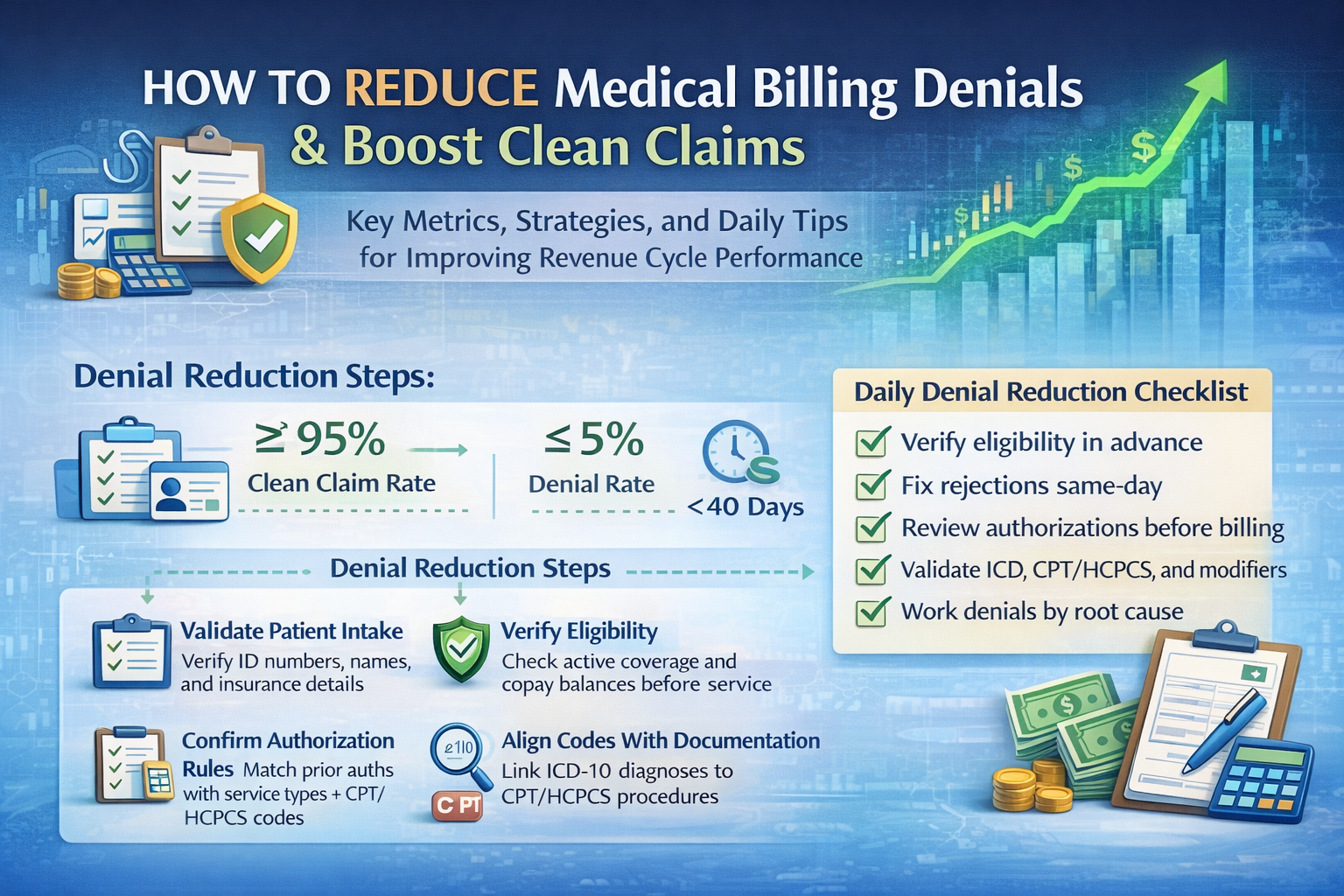
Clean claim rate: ≥ 95%
-
Denial rate: ≤ 5–10% (varies by specialty and payer mix)
Next, fix the front end, because most denials start there.
How Do You Reduce Denials With Better Patient and Insurance Data?
You reduce denials by standardizing patient intake and validating demographics at every visit. Incorrect member IDs and mismatched names drive avoidable rejections.
Front-end checklist (use at scheduling and check-in):
-
Collect the patient’s name as it appears on the insurance card
-
Confirm date of birth and address
-
Capture payer name, plan type, member ID, group number
-
Capture subscriber details when the patient is not the subscriber
-
Confirm referring provider when the plan requires it
Operational rule:
-
Staff verifies demographic fields every visit, not only for new patients.
Example:
-
Patient uses married name at check-in.
-
The insurance file uses the maiden name.
-
Claim rejected for subscriber mismatch.
-
Staff corrects the name and resubmits.
Next, verify eligibility and benefits with specific questions.
How Does Eligibility Verification Increase Clean Claim Rate?
Eligibility verification increases the clean claim rate because it confirms coverage and reveals authorization rules before you provide services.
Eligibility questions to document:
-
Is coverage active on the date of service?
-
What is the copay, deductible, and coinsurance?
-
Does the plan require prior authorization?
-
Is the provider in-network?
-
Is the service covered and limited by frequency?
Example:
-
Plan shows $1,500 deductible remaining.
-
Clinic collects the deposit and sets patient expectations.
-
Claim pays with the correct patient balance.
Next, stop authorization-related denials.
How Do You Prevent Prior Authorization Denials?
You prevent authorization denials by matching payer rules to service codes and tracking authorization numbers at charge entry.
Authorization controls:
-
Build an authorization required flag by payer + CPT/HCPCS
-
Store the authorization number in the claim in the correct field
-
Track: request date, approval date, units/visits, expiration date
Example denial cause → fix:
-
Denial: “authorization missing.”
-
Fix: obtain authorization, attachthe number, resubmit, or appeal with proof.
Next, reduce coding and documentation denials.
How Do You Reduce Coding-Related Denials?
You reduce coding denials by aligning CPT/HCPCS and ICD-10 codes with documentation and payer policy. Coding errors trigger medical necessity denials and bundling denials.
Coding controls that work:
-
Use ICD-10 specificity when required (laterality, episode of care, severity)
-
Validate modifier usage (25, 59, 50, 76, 77, TC/26, X{EPSU})
-
Check NCCI edits when applicable
-
Avoid unbundling and upcoding patterns
Example:
-
Provider bills CPT 93000 (ECG complete).
-
Documentation supports only interpretation.
-
Correct code becomes 93010.
-
Accurate coding prevents audit risk and recoupment.
Next, implement claim edits before submission.
What Claim Scrubbing Steps Increase Clean Claim Percentage?
Claim scrubbing increases clean claim percentage by catching formatting and policy errors before the payer sees the claim.
Pre-submission claim edits:
-
Validate patient demographics and subscriber match
-
Validate provider NPI, taxonomy, and place of service
-
Validate diagnosis pointers and ICD-10 to CPT linkage
-
Validate units, dates, and modifiers
-
Validate the authorization number when required
-
Validate required attachments when the payer needs documentation
Tools that apply edits:
-
Practice management system rules
-
Clearinghouse edits
-
Custom payer-specific rulesets
Next, separate “rejections” from “denials.”
How Do You Reduce Rejections vs Denials?
You reduce rejections by fixing EDI and data-format errors; you reduce denials by fixing coverage, coding, and policy compliance.
| Outcome | Where it happens | Typical cause | Best fix |
|---|---|---|---|
| Rejection | Clearinghouse or payer intake | Invalid ID, missing field, bad format | Correct and resubmit |
| Denial | After adjudication | Coverage, medical necessity, policy | Correct, appeal, or rebill |
Operational rule:
-
Treat rejections as same-day fixes because they block the billing timeline.
Next, segment denial reasons to attack the biggest leaks.
Which Denial Categories Should You Attack First?
You should attack the highest-volume denial category and the highest-dollar denial category first. This increases cash faster than random fixes.
Common denial buckets:
-
Eligibility/coverage inactive
-
Authorization missing
-
Coding/modifier
-
Medical necessity
-
Timely filing
-
Coordination of benefits (COB)
-
Duplicate claim
-
Non-covered service
Denial triage method:
-
Sort by count
-
Sort by dollars
-
Fix the top 2 categories with process changes
Next, build a root-cause workflow.
What Is a Root-Cause Denial Workflow?
A root-cause workflow links each denial reason to one owner, one fix, and one prevention rule.
Use a denial action table:
| Denial reason | Root cause | Owner | Fix action | Prevention rule |
|---|---|---|---|---|
| Eligibility inactive | No verification on DOS | Front desk | Recheck eligibility, update payer | Verify eligibility 48–72 hours pre-visit |
| Missing auth | Auth not obtained | Referrals team | Request retro auth or appeal | Auth matrix by payer + CPT |
| Modifier invalid | Wrong modifier | Coding | Correct modifier, resubmit | Modifier rules by specialty |
| Medical necessity | ICD mismatch | Provider/coder | Add diagnosis or documentation | Documentation checklist per service |
This table turns denials into training.
Next, reduce timely filing losses.
How Do You Prevent Timely Filing Denials?
You prevent timely filing denials by shortening charge lag and working rejections daily.
Controls:
-
Set charge entry SLA: 24–72 hours after date of service
-
Work clearinghouse rejections daily
-
Track payer filing limits in a payer matrix
-
Use claim status checks (276/277) when no response arrives
Example:
-
Filing limit is 90 days.
-
Claim rejected on day 10.
-
Staff fixes on day 11.
-
Claim stays withinthe filing limit.
Next, improve payment posting accuracy.
How Does Payment Posting Reduce Denials?
Payment posting reduces repeat denials because accurate adjustments and remark codes reveal true payer behavior. Bad posting hides denial trends.
Posting rules:
-
Post ERA (835) consistently
-
Use correct adjustment codes and contractual write-offs
-
Capture CARC/RARC codes for denial analytics
-
Transfer balances to the patient only when the payer adjudication is final
Next, standardize patient collections to avoid “false denials” from COB issues.
How Do You Reduce COB and Patient Responsibility Problems?
You reduce COB denials by collecting primary and secondary insurance details and updating the payer order before submission.
COB checklist:
-
Ask if the patient has secondary coverage
-
Confirm which plan is primary
-
Capture subscriber details for each plan
-
Submit to primary first, then secondary with EOB/ERA info
Patient responsibility controls:
-
Provide estimates when possible
-
Collect copays at check-in
-
Offer payment plans for high deductibles
Next, implement QA audits that catch issues early.
What Quality Audits Increase Clean Claim Rate?
Quality audits increase clean claim rate by spotting patterns before they spread across hundreds of claims.
Weekly audits:
-
Review 20–50 claims per specialty
-
Check: eligibility proof, auth, coding support, modifiers, diagnosis linkage
-
Review the top 10 denials with screenshots and fixes
Training loop:
-
Turn each recurring denial into a 1-page SOP for staff.
Next, set practical targets.
What Targets Should You Set for the Next 30–60 Days?
You should set targets tied to a specific denial bucket and one workflow change.
Example targets:
-
Increase clean claim rate from 90% to 95% by adding claim scrubbing + eligibility verification
-
Reduce eligibility denials by 30% by verifying coverage 48–72 hours pre-visit
-
Reduce auth denials by 40% by using an auth matrix by payer + CPT
-
Reduce charge lag to < 3 days by setting an internal SLA
Next, you can implement a simple internal playbook.
Simple Playbook You Can Apply Immediately
You can raise the clean claim percentage by standardizing five daily actions.
Daily actions:
-
Verify eligibility for upcoming appointments
-
Fix clearinghouse rejections the same day
-
Run claim edits and stop claims with missing auth or invalid modifiers
-
Submit claims within 24–72 hours after the date of service
-
Work denials by root cause category, not by random queue order
This playbook increases first-pass payments.
Denial Reduction Checklist You Can Copy
You reduce denials when every claim passes these checks before submission.
Pre-submit checklist:
-
Patient demographics match the payer file
-
Coverage is active on the date of service
-
Authorization number present when required
-
ICD-10 supports CPT/HCPCS (medical necessity)
-
Modifiers validated and units correct
-
Provider NPI, taxonomy, and POS are correct
-
Timely filing window safe
learn how to build a payer matrix and a denial dashboard that show the exact reasons your clean claim rate drops.